Ask an ALEKS Implementation Manager: Suzie Alpeter on Time & Topic Reports
How can I easily preview a topic/question a student has worked on?
Tags
Blog
Higher Education
ALEKS
Article
Have any burning ALEKS questions you want answered by our implementation team? Submit them here and we will include them in our newsletter next month.
"My students ask for help on specific problems they’ve struggled on at home, but often don’t know the exact problem. How can I easily preview a topic/question a student has worked on?"
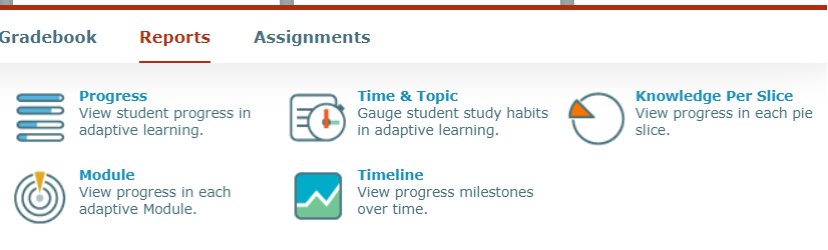
Suzie here: If you’re looking for a topic that a specific student was working on at a particular time, the fastest way to get there is by using the Time & Topic Report. From the student’s account, go to Reports > Time & Topic Report:
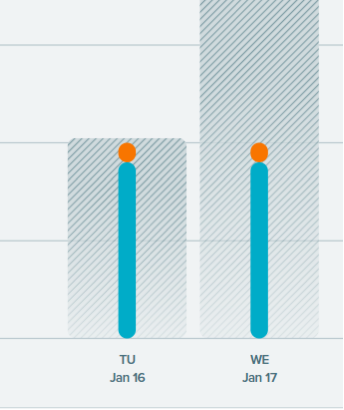
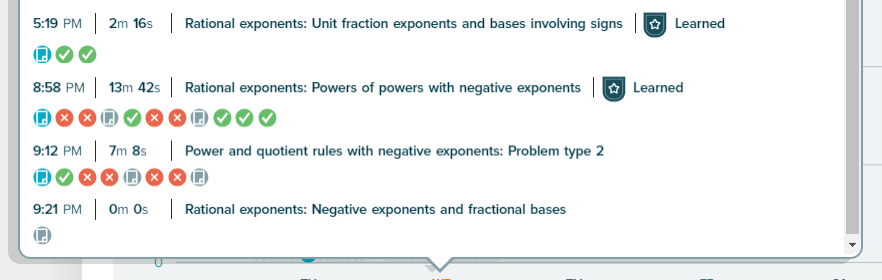
You can go to the specific date when a student was working, and click on the orange bubble to see the student’s learning sequence:
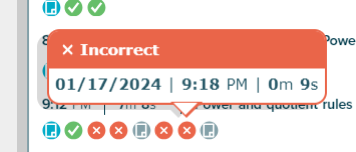
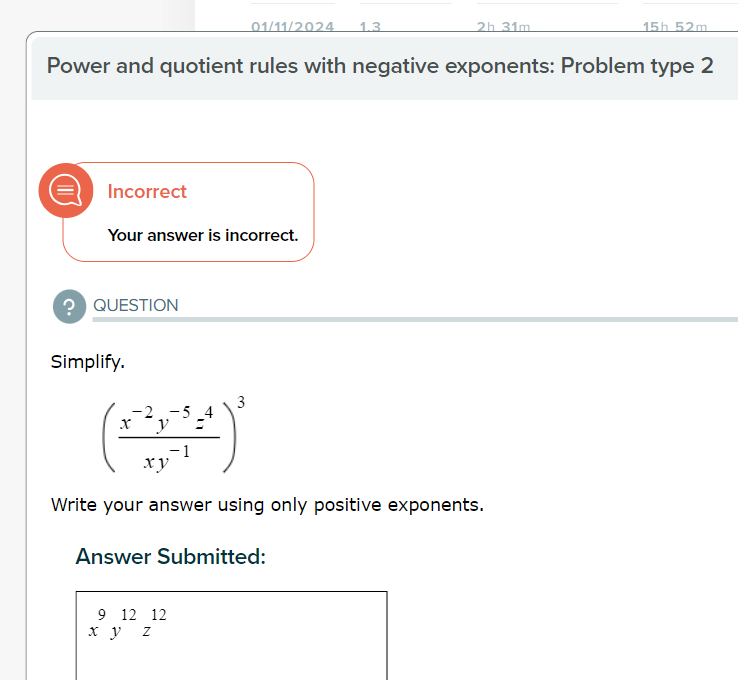
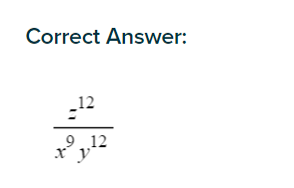
By clicking on the orange X’s, you can see the exact question that a student struggled with as well as how much time they spent, the answer they provided, and what the correct answer should have been:
Thanks to the Time & Topic report, you can see what your student has been working on at a granular level, and exactly where they went wrong! Many instructors lovingly refer to this report as the “Office Hours Report”.
Discover how ALEKS powers a dual enrollment College Algebra course where over 90% of students succeed — and mistakes become the foundation for real learning.
Regional Page Available
It looks like you're outside the United States. Do you want to see your regional version of this page?
aleks
student
Asset Format Type
Asset Format Type/Blog
Asset Format Type/Blog/Article
Programs & Solutions
Programs & Solutions/ALEKS
Business Unit
Business Unit/Higher Education
highered
2024-07-12T13:00:39.750-04:00
highered Ask an ALEKS Implementation Manager: Suzie Alpeter on Time & Topic Reports How can I easily preview a topic/question a student has worked on? Ask an ALEKS Implementation Manager: Suzie Alpeter on Time & Topic Reports How can I easily preview a topic/question a student has worked on? February 14, 2024 Have any burning ALEKS questions you want answered by our implementation team? Submit them here and we will include them in our newsletter next month. "My students ask for help on specific problems they’ve struggled on at home, but often don’t know the exact problem. How can I easily preview a topic/question a student has worked on?" Suzie here: If you’re looking for a topic that a specific student was working on at a particular time, the fastest way to get there is by using the Time & Topic Report. From the student’s account, go to Reports > Time & Topic Report: You can go to the specific date when a student was working, and click on the orange bubble to see the student’s learning sequence: By clicking on the orange X’s, you can see the exact question that a student struggled with as well as how much time they spent, the answer they provided, and what the correct answer should have been: Thanks to the Time & Topic report, you can see what your student has been working on at a granular level, and exactly where they went wrong! Many instructors lovingly refer to this report as the “Office Hours Report”. I hope this helps! Suzie
How can I easily preview a topic/question a student has worked on?

 "My students ask for help on specific problems they’ve struggled on at home, but often don’t know the exact problem. How can I easily preview a topic/question a student has worked on?"